

Introduction
A website chatbot can answer frequently asked questions, guide visitors to relevant pages, and provide basic customer support. But as businesses grow, customer expectations and operational requirements become more complex. Customers want more than predefined answers. They want assistance that understands their requirements, accesses relevant information, and helps them complete tasks.
This is where an Enterprise Digital Assistant becomes valuable.
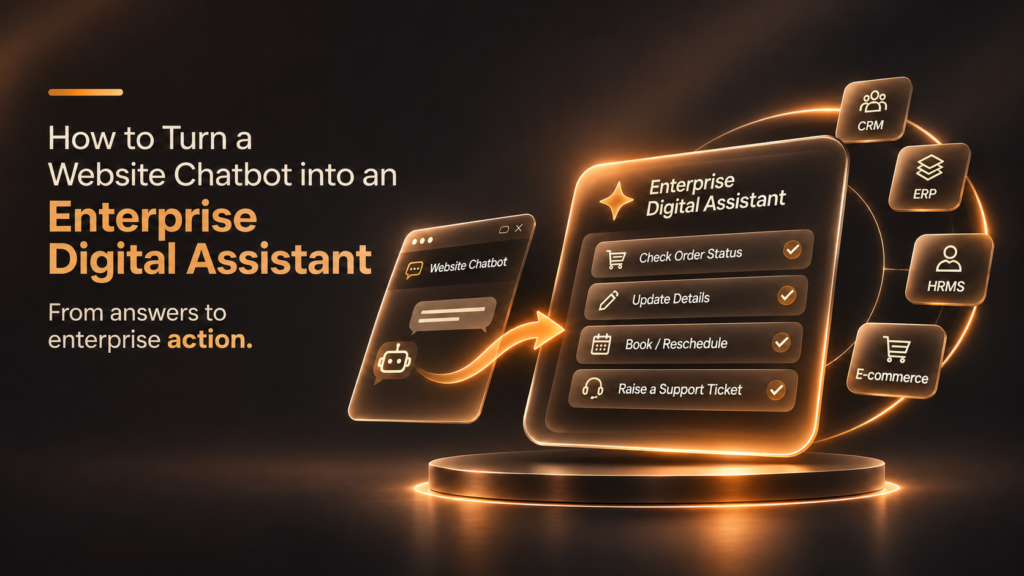
Unlike a traditional website chatbot that primarily responds to messages, an enterprise digital assistant can connect with business applications, retrieve contextual information, coordinate workflows, and execute authorized actions. It can support customers, employees, sales teams, and business operations through a unified conversational interface.
Imagine a customer visiting an enterprise website and asking:
“I want to check the status of my order, update my delivery address, and speak to someone if the change is not possible.”
A basic chatbot might provide a link to the order-tracking page and explain the address-change policy. An enterprise digital assistant could authenticate the customer, retrieve order information, check whether the address can be updated, initiate the permitted change, and escalate the request if necessary.
The difference is significant: the experience moves from answering questions to helping users achieve outcomes.
For organizations already using website chatbots, the next step does not necessarily involve replacing the existing solution. It involves expanding its capabilities through enterprise knowledge, integrations, AI reasoning, workflow automation, and governance.
This guide explains how businesses can make that transition.
1. Website Chatbot vs. Enterprise Digital Assistant: Understanding the Difference
Before upgrading an existing chatbot, businesses need to understand what separates a conventional chatbot from an enterprise digital assistant.
A traditional chatbot is generally designed to handle predefined conversations. It may answer FAQs, collect contact information, and direct visitors to relevant resources.
An enterprise digital assistant goes further by understanding user intent, retrieving information from multiple authorized sources, and coordinating actions across connected systems.
| Capability | Traditional Website Chatbot | Enterprise Digital Assistant |
|---|---|---|
| Customer interaction | Predefined conversations | Context-aware conversations |
| Knowledge access | Static FAQs and selected content | Connected enterprise knowledge sources |
| Personalization | Basic user segmentation | Contextual and user-specific assistance |
| System integration | Limited integrations | CRM, ERP, HRMS, e-commerce, and other applications |
| Task execution | Mostly redirects or collects information | Can initiate and complete authorized workflows |
| Decision support | Rule-based responses | AI-assisted reasoning within defined boundaries |
| Employee assistance | Limited | Can support internal business operations |
| Escalation | Basic human handoff | Context-aware escalation with interaction history |
| Governance | Basic conversation controls | Identity, permissions, auditability, and workflow controls |
The objective is not to eliminate traditional chatbot functionality. It is to build on it.
An enterprise digital assistant can retain existing FAQ capabilities while introducing more advanced features that support real business processes.
2. Why Businesses Need to Upgrade Their Website Chatbots
Many organizations have already invested in chatbot technology. However, these implementations often remain limited to answering repetitive questions.
This creates a gap between what customers expect and what the chatbot can actually deliver.
2.1 Customers Want Resolutions, Not Just Answers
Customers do not always visit a website to find information. They often arrive with a specific task they want to complete.
Examples include:
- Checking an order or service request.
- Updating account information.
- Booking a consultation.
- Requesting a product demonstration.
- Downloading an invoice.
- Raising a support ticket.
- Checking application or request status.
A chatbot that only provides instructions adds another step to the customer journey.
An enterprise digital assistant can help complete these activities through connected business workflows.
2.2 Enterprise Information Is Spread Across Multiple Systems
Large organizations typically manage information across different platforms.
For example:
- CRM systems store customer interactions.
- ERP systems manage business operations.
- HRMS platforms contain employee information.
- E-commerce platforms manage products and orders.
- Support platforms track customer issues.
- Knowledge management systems store policies and documentation.
A standalone chatbot may not have access to these sources.
An enterprise digital assistant can connect authorized systems and retrieve relevant information when required, reducing the need for users to navigate multiple applications.
2.3 Manual Processes Create Operational Friction
Many customer and employee requests still involve repetitive manual work.
A customer may need to submit a form, wait for an employee, provide information again, and follow up to receive an update.
With suitable integrations, an AI assistant can automate parts of this process, reducing unnecessary handoffs and improving operational efficiency.
2.4 Businesses Need Consistent Digital Experiences
Customers may interact with a company through its website, mobile application, messaging platforms, and support channels.
A disconnected chatbot creates fragmented experiences.
An enterprise digital assistant can help maintain consistent interactions by using shared business knowledge, authorized customer context, and connected workflows across supported channels.
3. The Six Capabilities That Turn a Chatbot into an Enterprise Digital Assistant
Upgrading a chatbot requires more than connecting it to a larger AI model. The transformation involves several technical and operational capabilities.
3.1 Context-Aware Natural Language Understanding
A basic chatbot may recognize keywords and match them to predefined answers.
An enterprise digital assistant needs to understand the intent behind a request, including relevant context from the ongoing conversation.
Consider this interaction:
Customer: I want to know where my order is.
Assistant: I can help with that. Could you share your order number?
Customer: ORD-2048.
Assistant: Your order is currently in transit. Would you also like to check the expected delivery date?
The assistant understands the relationship between the messages instead of treating each message as an independent question.
Contextual understanding becomes especially important when requests involve multiple steps, follow-up questions, or incomplete information.
3.2 Enterprise Knowledge Integration
A digital assistant should be able to retrieve information from relevant business knowledge sources.
These may include:
- Product documentation.
- Company policies.
- Service manuals.
- Internal knowledge bases.
- Technical documentation.
- FAQs and support articles.
- Approved business documents.
Retrieval-Augmented Generation (RAG) can help connect language models with enterprise knowledge.
Rather than relying entirely on information learned during model training, a RAG-based system retrieves relevant content from an approved knowledge source and uses it to generate a grounded response.
For example, an employee asking about a reimbursement policy could receive an answer based on the organization’s latest approved policy document.
This helps improve relevance and reduces dependence on outdated or generic responses.
3.3 Integration with Enterprise Applications
This is one of the most important steps in chatbot transformation.
A digital assistant becomes significantly more useful when it can interact with the applications employees and customers already use.
| Enterprise System | Potential Assistant Capability |
|---|---|
| CRM | Retrieve customer records and update interaction details |
| ERP | Access relevant operational and order information |
| HRMS | Answer employee questions and initiate HR requests |
| E-commerce | Search products and support order-related workflows |
| ITSM | Create, categorize, and track support tickets |
| Knowledge Management | Retrieve approved internal information |
| Scheduling Systems | Check availability and create appointments |
Integrations should be implemented through secure APIs, approved connectors, or middleware.
The assistant should receive only the information and permissions necessary for its assigned tasks.
3.4 AI Agents and Workflow Execution
A conventional chatbot usually follows a fixed conversation path.
An enterprise digital assistant can use AI agents to coordinate tasks that require multiple steps.
For example, consider a customer requesting a product demonstration.
The assistant may need to:
- Understand the customer’s requirements.
- Collect relevant business details.
- Identify the appropriate sales team.
- Check available meeting slots.
- Schedule a demonstration after confirmation.
- Create or update the CRM record.
- Send a confirmation message.
These steps can be coordinated through workflow orchestration and authorized tools.
AI agents can help determine the appropriate sequence of actions, while predefined business rules control what the system is allowed to execute.
3.5 Personalization and User Context
Enterprise digital assistants should provide relevant experiences based on the user’s role, permissions, preferences, and interaction context.
For example:
- A customer may need order information.
- A sales representative may need lead details.
- An HR employee may need recruitment information.
- An IT administrator may need incident status.
- A manager may need an operational summary.
Personalization should not mean unrestricted access to user data. Identity verification and role-based permissions must determine which information is available.
3.6 Human Handoff and Continuous Learning
Not every request should be handled automatically.
An enterprise assistant should recognize when it needs human support.
Common escalation scenarios include:
- Complex complaints.
- Sensitive account requests.
- Uncertain or conflicting information.
- High-impact business decisions.
- Failed integrations.
- Requests outside the assistant’s authorized capabilities.
When escalating, the assistant should pass relevant conversation context and completed steps to the human representative.
This avoids making users repeat their entire problem.
4. A Practical Architecture for an Enterprise Digital Assistant
A reliable enterprise digital assistant requires multiple components working together.
The following architecture provides a useful starting point.
| Layer | Main Responsibility | Example Components |
|---|---|---|
| Experience Layer | Interacts with users | Website widget, mobile app, messaging interface |
| AI Layer | Understands and processes requests | Language models, intent recognition, agent orchestration |
| Knowledge Layer | Retrieves relevant information | RAG, document repositories, vector databases |
| Integration Layer | Connects business applications | APIs, middleware, enterprise connectors |
| Workflow Layer | Coordinates business tasks | Workflow engine, automation rules, approval processes |
| Security Layer | Controls access and protects data | Authentication, authorization, encryption, audit logs |
| Monitoring Layer | Tracks performance and reliability | Analytics, tracing, error monitoring, feedback |
How the Architecture Works
- A user submits a request through the website chatbot.
- The AI layer interprets the intent and identifies the required information.
- The knowledge layer retrieves relevant documents or business context.
- The orchestration layer determines whether a tool or workflow is required.
- The integration layer communicates with the relevant enterprise application.
- Security controls validate the user’s identity, permissions, and action requirements.
- The assistant returns the result or escalates the request.
This architecture allows businesses to expand chatbot capabilities without treating every new use case as an entirely separate application.
5. Real-World Use Cases Across Enterprise Functions
An enterprise digital assistant can support both customer-facing and internal business operations.
5.1 Customer Support Assistant
A customer support assistant can help users resolve common issues without waiting for a human representative.
Example workflow:
A customer reports that a purchased product is not working.
The assistant can:
- Identify the product and order.
- Retrieve the warranty information.
- Ask relevant troubleshooting questions.
- Provide approved troubleshooting instructions.
- Create a support ticket if the issue remains unresolved.
- Share the ticket reference with the customer.
The result is a more structured support experience.
5.2 Sales and Lead Qualification Assistant
Sales teams often receive enquiries through website forms and chat widgets.
An enterprise digital assistant can help qualify these enquiries by collecting relevant information.
For example, it can ask about:
- Business requirements.
- Industry.
- Company size.
- Expected project timeline.
- Budget range, where appropriate.
- Required products or services.
With suitable CRM integration, the assistant can create a lead record, assign it to the relevant team, and schedule a follow-up.
5.3 HR and Employee Assistance Assistant
Internal digital assistants can reduce repetitive HR queries.
Employees may ask about leave policies, payroll processes, onboarding requirements, and company guidelines.
A connected assistant can retrieve approved HR information and initiate supported requests.
For example:
An employee asks, “How many leave days do I have remaining?”
The assistant can authenticate the employee, retrieve the permitted leave balance from the HRMS, and provide the current information.
5.4 IT Service Desk Assistant
IT teams receive repeated requests involving password resets, access permissions, software installation, and incident reporting.
An enterprise assistant can:
- Retrieve approved IT troubleshooting instructions.
- Categorize incoming issues.
- Create incident tickets.
- Check ticket status.
- Route complex problems to the appropriate team.
Sensitive operations, such as changing access permissions, should follow identity verification and approval requirements.
5.5 E-Commerce Shopping Assistant
An e-commerce assistant can help customers discover products and complete shopping-related tasks.
For example, a customer could say:
“I’m looking for a lightweight laptop for office work under ₹70,000.”
The assistant can search the connected product catalog, compare specifications, check availability, and present relevant options.
With customer confirmation and appropriate integrations, it may also add a selected product to the cart.
5.6 Operations and Internal Knowledge Assistant
Enterprise employees frequently spend time searching for information across documents, systems, and internal platforms.
A digital assistant can provide a unified conversational interface for finding approved information.
For example, an operations manager could ask for the latest status of a specific project and receive a summary based on accessible project records.
The assistant can also help initiate routine operational workflows when authorized.
6. Step-by-Step Roadmap: Upgrading an Existing Website Chatbot
Businesses do not need to transform every chatbot capability at once.
A phased approach makes implementation easier to manage and measure.
Phase 1: Audit the Existing Chatbot
Start by understanding what the current chatbot can and cannot do.
Evaluate:
- Existing conversation flows.
- Frequently asked questions.
- Unresolved customer requests.
- Integration capabilities.
- User satisfaction.
- Escalation patterns.
- Available analytics.
Identify where customers repeatedly leave the chatbot to complete tasks elsewhere.
These gaps can reveal the strongest opportunities for improvement.
Phase 2: Identify High-Value Use Cases
Prioritize use cases based on customer impact, operational value, implementation effort, and risk.
| Use Case | Business Value | Implementation Complexity |
|---|---|---|
| FAQ automation | High | Low |
| Knowledge retrieval | High | Medium |
| Lead qualification | High | Medium |
| Support ticket creation | High | Medium |
| Order tracking | High | Medium |
| Appointment scheduling | Medium–High | Medium |
| Multi-system workflow execution | High | High |
Start with a small number of clearly defined workflows rather than trying to automate every business process immediately.
Phase 3: Build an Enterprise Knowledge Base
Collect the information that the assistant needs to answer questions accurately.
Organize content into categories such as:
- Customer support.
- Products and services.
- Company policies.
- Technical documentation.
- Internal employee resources.
- Operational procedures.
Review documents for accuracy, ownership, access permissions, and update frequency.
If using RAG, test whether the retrieval system consistently identifies the correct source documents before generating responses.
Phase 4: Connect Business Applications
Identify which enterprise systems are required for the selected use cases.
For example:
- CRM for lead management.
- ERP for order information.
- HRMS for employee requests.
- ITSM for service tickets.
- Scheduling platforms for appointments.
Build and test the integrations with appropriate authentication, access restrictions, and error handling.
Phase 5: Introduce AI Agents and Workflow Automation
Once the assistant can retrieve information and communicate with connected systems, introduce controlled action execution.
Define:
- What the assistant can read.
- What it can recommend.
- What it can initiate.
- Which actions require user confirmation.
- Which actions require employee approval.
- When the workflow must stop and escalate.
This establishes clear operational boundaries.
Phase 6: Test Security, Accuracy, and Reliability
Test the assistant using real-world scenarios.
Include:
- Ambiguous customer questions.
- Incorrect or incomplete information.
- Unauthorized access attempts.
- Failed API calls.
- Duplicate requests.
- Conflicting knowledge sources.
- High-risk actions.
- Human escalation scenarios.
Validate not only whether the assistant generates an appropriate answer, but also whether its underlying actions are correct.
Phase 7: Launch, Monitor, and Optimize
Start with a limited group of users or selected website journeys.
Track performance, collect feedback, resolve issues, and gradually expand the assistant’s responsibilities.
This approach reduces implementation risk while allowing teams to demonstrate business value.
7. Security and Governance: What Enterprises Must Get Right
An enterprise digital assistant may interact with sensitive business information and perform actions across multiple applications.
Security and governance should therefore be part of the architecture from the beginning.
Identity and Access Management
The assistant should verify user identity when accessing protected information or performing sensitive operations.
Use role-based access controls and enforce permissions at the application and API levels.
Data Privacy
Only collect and process information necessary for the requested task.
Establish appropriate data retention, encryption, consent, and privacy controls based on applicable requirements.
Action Authorization
Not every action should be available to every user.
For example, an employee may be allowed to view a request but not approve it.
The assistant must respect existing business permissions rather than creating an alternative path around them.
Audit Trails
Maintain records of important operations, including:
- User requests.
- Information sources accessed.
- Actions attempted.
- Approval decisions.
- Execution results.
- Escalations and failures.
These records help organizations investigate issues and demonstrate accountability.
Reliability and Recovery
Enterprise workflows should account for failures.
If an API call fails or a downstream system becomes unavailable, the assistant should communicate the problem accurately instead of claiming that the task is complete.
For multi-step operations, businesses should consider transaction controls, duplicate prevention, retries, and recovery procedures.
8. Common Mistakes to Avoid When Upgrading a Chatbot
Many chatbot transformation projects fail to deliver their expected value because businesses focus too heavily on the AI interface and overlook the operational foundation.
| Common Mistake | Why It Creates Problems | Better Approach |
|---|---|---|
| Simply replacing the chatbot model | Does not create business integration | Build connected workflows |
| Using outdated knowledge | Produces unreliable answers | Maintain approved, current information |
| Connecting every system immediately | Increases complexity and risk | Start with prioritized use cases |
| Giving excessive permissions | Creates security exposure | Apply least-privilege access |
| Automating sensitive decisions | Can create operational and compliance issues | Add approval and human review |
| Ignoring failed actions | Damages customer trust | Validate execution and provide clear status |
| Measuring only chatbot conversations | Does not prove business value | Track completed tasks and outcomes |
| Removing human support | Leaves complex requests unresolved | Maintain context-aware escalation |
A successful transformation requires a balance between AI capability, enterprise integration, user experience, and operational governance.
9. How to Measure the Success of an Enterprise Digital Assistant
The performance of an enterprise digital assistant should be evaluated using business outcomes rather than conversation volume alone.
| KPI | What It Measures | Business Impact |
|---|---|---|
| Task Completion Rate | Percentage of requests successfully completed | Measures operational effectiveness |
| First Contact Resolution | Issues resolved in the initial interaction | Improves support efficiency |
| Average Resolution Time | Time required to resolve a request | Reduces customer waiting |
| Human Escalation Rate | Percentage of interactions requiring human support | Identifies automation opportunities |
| Knowledge Accuracy | Relevance and correctness of retrieved information | Improves trust |
| Action Failure Rate | Percentage of attempted actions that fail | Measures workflow reliability |
| Customer Satisfaction (CSAT) | Customer feedback after interactions | Evaluates experience quality |
| Lead Conversion Rate | Percentage of qualified leads converting | Measures sales contribution |
| Employee Adoption Rate | Usage among internal employees | Evaluates internal usefulness |
For example, a company may discover that its website chatbot handles thousands of conversations but resolves relatively few customer requests.
After integrating the assistant with its CRM and support platform, the company can measure whether more requests are completed without manual intervention.
This provides a clearer picture of the transformation’s business value.
10. The Future of Enterprise Digital Assistants
The evolution of enterprise chatbots is moving toward more capable AI assistants that can understand context, use connected tools, and coordinate multi-step workflows.
Several developments are likely to shape this direction.
Multi-agent collaboration: Specialized AI agents may work together on tasks such as customer support, sales qualification, and operational coordination.
Deeper enterprise integration: Assistants will increasingly connect with business applications, allowing users to access information and initiate workflows through conversational interfaces.
More personalized interactions: AI systems will use authorized context to provide assistance that is more relevant to individual customers and employees.
Proactive assistance: With appropriate event data and business rules, assistants may identify issues and notify users before they need to ask for help.
Greater governance and control: As assistants gain more operational capabilities, organizations will need stronger identity controls, audit trails, approval mechanisms, and monitoring.
The future is not simply about building a chatbot that sounds more human. It is about building a digital assistant that works reliably within the organization’s business environment.
How Moptra Helps Businesses Move Toward Intelligent Digital Assistance
Turning a website chatbot into an enterprise digital assistant requires a combination of AI engineering, enterprise integration, workflow automation, and user experience design.
Moptra works across AI, automation, and enterprise technology to help businesses explore intelligent solutions that support customer and employee experiences.
Relevant areas of focus include:
- AI-Powered Assistants: Conversational experiences designed to help users access information and complete supported tasks.
- Agentic AI and Workflow Automation: Intelligent workflows that coordinate multiple steps across business processes.
- Enterprise Application Integration: Connecting AI capabilities with relevant business systems and data sources.
- Customer Experience Automation: Reducing friction across customer interactions and service journeys.
- Custom AI Solutions: Developing solutions around specific organizational requirements and operational workflows.
Conclusion
A website chatbot is a useful starting point for digital engagement, but enterprise requirements demand more than automated conversations.
An enterprise digital assistant brings together conversational AI, business knowledge, system integrations, and workflow automation to help customers and employees complete meaningful tasks.
The transformation starts by identifying repetitive interactions, connecting approved knowledge sources, integrating relevant applications, and introducing controlled AI-driven workflows.
However, success depends on more than technical capabilities. Security, permissions, reliability, human oversight, and measurable outcomes must remain central to the implementation.
Businesses that take a phased and outcome-focused approach can turn their existing chatbot into a more capable digital assistant without losing the value of their current investment.
The next evolution of enterprise chatbots is not about answering more questions. It is about helping people get more work done.
Frequently Asked Questions
1. What is an enterprise digital assistant?
An enterprise digital assistant is an AI-powered system that helps customers and employees access business information, interact with enterprise applications, and complete authorized tasks through conversational interfaces.
2. How is an enterprise digital assistant different from a website chatbot?
A traditional website chatbot primarily answers questions and follows predefined conversation flows. An enterprise digital assistant can also retrieve information from business systems, understand context, and coordinate multi-step workflows.
3. Can an existing website chatbot be upgraded into an enterprise digital assistant?
Yes. Businesses can extend an existing chatbot by introducing advanced language understanding, enterprise knowledge retrieval, API integrations, AI agents, workflow automation, and security controls. The exact approach depends on the existing chatbot platform and architecture.
4. What technologies are required to build an enterprise digital assistant?
Common technologies include large language models, RAG, APIs, workflow orchestration, CRM and ERP integrations, vector databases, authentication systems, and monitoring tools.
5. What is the role of AI agents in enterprise digital assistants?
AI agents can interpret goals, plan steps, use connected tools, and coordinate workflows. They help the assistant move beyond providing information toward completing supported business tasks.
6. Can an enterprise digital assistant connect with CRM and ERP systems?
Yes. Through secure APIs, approved connectors, or middleware, an assistant can retrieve and update permitted information in CRM, ERP, HRMS, and other enterprise applications.
7. Is an enterprise digital assistant secure?
It can be designed with enterprise security controls such as authentication, role-based permissions, encryption, audit logging, and approval workflows. Security depends on implementation and ongoing governance.
8. Can enterprise digital assistants support internal employees?
Yes. They can help employees find company policies, retrieve approved documentation, create IT tickets, initiate HR requests, and access permitted business information.
9. How long does it take to upgrade a chatbot into an enterprise digital assistant?
The timeline depends on the existing chatbot, integration requirements, data quality, security needs, and number of workflows. A focused pilot can be a practical first step before expanding to more complex use cases.
10. What is the biggest challenge in chatbot-to-assistant transformation?
The biggest challenge is often connecting AI capabilities with reliable enterprise data and business workflows while maintaining security, permissions, and operational control.
Related Posts
Transforming Pharma Retail: Th...
The pharmaceutical retail landscape is evolving, and companies like Mercury Drug are embracing digital transformation to meet the ...
Here are some new ideas to imp...
Leverage Live Video: Incorporate live video into your product pages to provide customers with a more immersive and interactive sho...
From Answering Questions to Ta...
Introduction AI Chatbot Agents are changing the role of conversational AI in business. Traditional chatbots were primarily design...