

Introduction
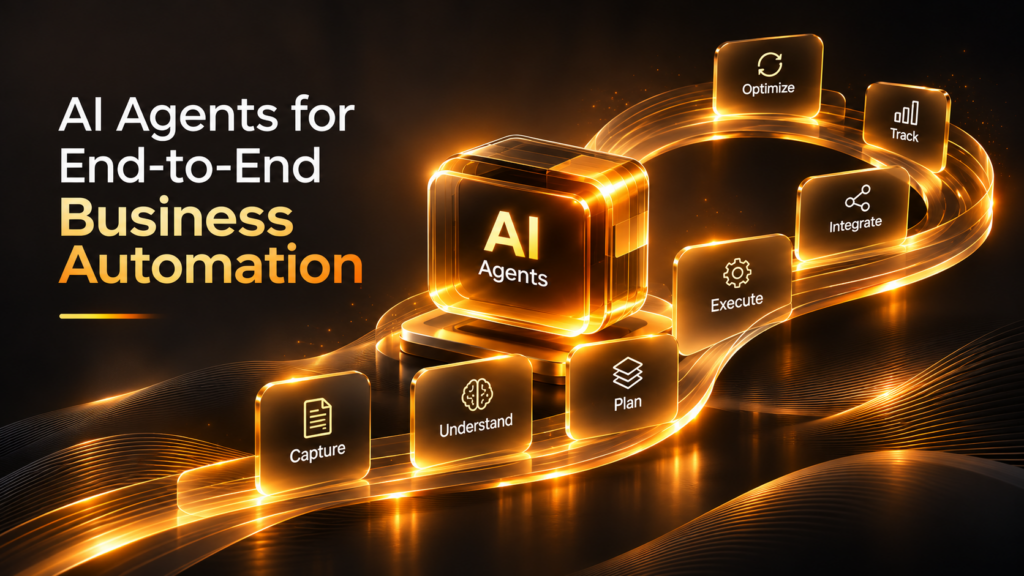
AI Agents for Business Automation are changing how organizations manage everyday operations, coordinate teams, and execute complex business processes. Instead of automating individual tasks in isolation, AI agents can connect multiple activities, interact with business applications, make decisions within defined boundaries, and move workflows toward completion.
Consider a typical customer inquiry.
A potential customer submits a request through a company’s website. The sales team receives the inquiry, checks the customer’s requirements, updates the CRM, prepares a response, schedules a meeting, and coordinates with the technical team. Once the opportunity progresses, another set of activities begins involving proposals, approvals, contracts, and onboarding.
Traditionally, employees manage these steps across different tools and departments. Information moves between systems, follow-ups depend on manual reminders, and delays occur whenever one activity is waiting for another.
Now imagine AI agents coordinating these activities.
One agent understands the customer’s inquiry. Another retrieves relevant product information. A workflow agent updates the CRM, prepares a follow-up, and schedules the next action with the appropriate approval. Other agents can support documentation, reporting, and onboarding.
This is the shift from task automation to end-to-end business automation.
For enterprises, the opportunity is not simply to make individual employees faster. It is to create connected workflows in which information, decisions, and actions move across the organization with less manual coordination.
AI agents are moving business automation beyond executing instructions toward managing complete processes within clearly defined operational boundaries.
What Are AI Agents for Business Automation?
AI Agents for Business Automation are intelligent software systems that use AI models, business data, and connected tools to understand objectives, determine appropriate actions, and execute tasks toward a defined outcome.
Unlike conventional automation, which generally follows predefined rules and sequences, AI agents can interpret changing inputs and adapt their actions to the situation.
For example, a traditional workflow might automatically send an email whenever a customer submits a form.
An AI agent-based workflow could:
- Interpret the customer’s message.
- Identify the type of inquiry.
- Retrieve relevant company information.
- Determine the appropriate response.
- Check whether additional information is required.
- Create or update a CRM record.
- Prepare a personalized follow-up.
- Route the inquiry to the correct team.
The exact level of autonomy depends on the system’s design, integrations, permissions, and approval requirements.
How AI Agents Differ From Traditional Automation
Traditional automation is effective when processes are predictable and rules are clearly defined. AI agents become useful when workflows involve varied inputs, contextual decisions, and multiple connected systems.
| Capability | Traditional automation | AI agent-based automation |
|---|---|---|
| Execution | Follows predefined rules and steps | Can determine actions based on context and objectives |
| Input handling | Often depends on structured inputs | Can interpret natural-language and unstructured information |
| Decision-making | Uses configured conditions | Can reason within defined boundaries |
| Workflow management | Executes predefined sequences | Can coordinate multiple activities and adapt to exceptions |
| System interaction | Uses configured integrations | Can select and use authorized tools |
| Exception handling | Often follows predefined fallback rules | Can interpret certain exceptions and escalate others |
| Human involvement | Commonly required for unconfigured situations | Can operate independently within approved limits |
AI agents do not replace every form of traditional automation. In many enterprise environments, the strongest architecture combines deterministic workflows for predictable operations with AI agents for interpretation, coordination, and decisions that require context.
Why Businesses Are Moving Toward End-to-End AI Automation
Many organizations have already automated individual activities. They may use CRM automation for sales, workflow tools for approvals, chatbots for customer support, and reporting platforms for analytics.
However, these systems often operate independently.
The result is automation without complete workflow coordination.
1. Disconnected Systems Create Operational Delays
Business information is commonly distributed across CRM platforms, ERP systems, email, project management tools, support applications, and document repositories.
Employees frequently move between these systems to complete a single process.
For example, processing a new customer order may require checking customer details, confirming inventory, reviewing payment status, updating the ERP, and notifying the delivery team.
AI agents can coordinate authorized activities across connected systems, reducing unnecessary manual handoffs.
2. Repetitive Coordination Consumes Employee Time
Employees spend considerable time on activities that do not directly require specialist judgment.
Examples include:
- Updating records.
- Preparing routine reports.
- Sending follow-up reminders.
- Collecting information from different departments.
- Organizing documents.
- Routing requests.
- Checking workflow status.
AI agents can handle suitable repetitive activities and allow employees to focus on complex decisions, customer relationships, and strategic work.
3. Business Processes Need More Than Individual Task Automation
Automating one task does not necessarily improve the entire process.
For example, an AI system may generate a customer support response in seconds, but if the ticket is not updated, the issue is not routed, and the customer does not receive the required follow-up, the overall process remains incomplete.
End-to-end automation focuses on the outcome of the complete workflow rather than the speed of a single activity.
4. Organizations Need Faster Responses to Changing Business Conditions
Customer requirements, order priorities, operational issues, and market conditions can change during a workflow.
AI agents can interpret new information and adjust suitable actions within their authorization limits.
This makes them useful for processes where rigid automation struggles with unexpected inputs.
5. Businesses Want Automation That Can Scale Across Departments
As organizations grow, the number of workflows, applications, and operational dependencies increases.
A well-designed agent architecture can support multiple departments while maintaining shared standards for access, monitoring, accountability, and governance.
Microsoft’s guidance on core business process transformation describes how agents can orchestrate enterprise processes across systems, handle routine cases within defined boundaries, and escalate exceptions to people.
How AI Agents Automate an Entire Business Workflow
End-to-end automation requires more than connecting an AI model to business applications. The system needs to understand the workflow, retrieve relevant information, determine what should happen next, execute authorized actions, and verify the outcome.
A typical AI-powered workflow can operate through the following stages.
Stage 1: Understand the Business Objective
The process begins with an event, request, or business objective.
Examples include:
- A new customer inquiry.
- An incoming purchase order.
- A support ticket.
- An employee onboarding request.
- A new invoice.
- A project approval request.
The AI agent interprets the input and identifies the intended business outcome.
Stage 2: Retrieve Relevant Business Information
The agent accesses authorized data sources to understand the context.
Depending on the workflow, this may include customer records, product information, company policies, previous interactions, inventory data, or operational documents.
Information access should follow organizational permissions and data governance policies.
Stage 3: Plan the Required Actions
The agent determines which steps are necessary to move the process forward.
For example, processing a customer inquiry might require identifying the customer, checking the requested service, retrieving relevant information, and preparing a follow-up.
For more complex workflows, multiple specialized agents may handle different responsibilities.
Stage 4: Execute Actions Through Connected Systems
The agent uses authorized tools and integrations to perform tasks.
These may include creating records, updating fields, retrieving documents, generating drafts, scheduling activities, or initiating workflow requests.
Actions with significant business consequences should require appropriate confirmation or approval.
Stage 5: Verify the Results
The workflow checks whether the intended action was completed successfully.
For example, after creating a CRM record, the system can verify that the record exists and contains the required information.
If an integration fails or the result is uncertain, the workflow should flag the issue rather than assume success.
Stage 6: Escalate Exceptions and Monitor Outcomes
When the agent encounters missing information, conflicting instructions, an unauthorized action, or an unusual situation, it should pause or route the issue to the appropriate person.
The system can also record its actions, decisions, and outcomes for monitoring and improvement.
7 Business Functions That Can Benefit From AI Agents
AI agents can support a wide range of business operations. Their value is highest when workflows involve repetitive coordination, multiple information sources, and clearly defined actions.
1. Sales and Lead Management Automation
Sales teams manage inquiries, lead qualification, CRM updates, follow-ups, meetings, proposals, and opportunity tracking.
These activities often involve multiple tools and repeated administrative work.
An AI-powered sales workflow can:
- Interpret incoming customer inquiries.
- Extract relevant lead information.
- Categorize leads based on defined criteria.
- Retrieve relevant product and service information.
- Prepare personalized follow-up drafts.
- Update CRM records.
- Schedule approved follow-up activities.
- Generate sales summaries.
Example:
A prospect submits an inquiry about enterprise commerce development.
An AI agent identifies the requested services, extracts the prospect’s requirements, retrieves relevant company capabilities, creates a CRM record, and prepares a follow-up for the sales team.
A representative reviews the proposed message and handles the relationship-building conversation.
Business value: Better-organized leads, reduced administrative work, and more consistent follow-up processes.
2. Customer Support Automation
Customer support teams receive questions involving product usage, account information, troubleshooting, billing, and service requests.
AI agents can coordinate suitable support activities by:
- Understanding customer issues.
- Retrieving relevant help documentation.
- Identifying common troubleshooting steps.
- Creating and categorizing support tickets.
- Checking available case information.
- Preparing responses.
- Routing complex issues to the correct team.
- Updating ticket status through authorized integrations.
Example:
A customer reports that an order has not been delivered.
The agent retrieves the order information from the authorized system, checks its current status, and provides the verified update. If the order requires investigation, it creates or routes a support case.
Business value: More efficient ticket handling, faster access to information, and reduced repetitive support work.
3. Human Resources and Employee Operations
HR teams manage recruitment, onboarding, employee requests, documentation, leave-related questions, and internal policies.
AI agents can assist with:
- Answering common HR questions.
- Retrieving approved employee policies.
- Collecting onboarding information.
- Preparing joining documentation.
- Coordinating task assignments.
- Routing employee requests.
- Generating onboarding progress reports.
Example:
When a new employee joins, an AI agent can initiate an onboarding checklist, notify relevant departments, prepare document requests, and track completion.
Sensitive employment decisions, compensation changes, and other high-impact matters should remain subject to appropriate human review.
Business value: Better coordination, fewer missed onboarding activities, and more accessible employee information.
4. Finance and Invoice Processing
Finance teams frequently handle invoices, purchase orders, expense claims, payment records, and approval workflows.
AI agents can support these processes by:
- Extracting invoice information.
- Matching invoices with purchase orders.
- Identifying missing fields.
- Flagging discrepancies.
- Preparing approval requests.
- Updating authorized financial records.
- Generating reconciliation summaries.
Example:
An invoice arrives by email. The agent extracts the vendor, invoice number, amount, and due date. It checks the available purchase order information and flags a mismatch for finance review.
The agent can prepare the next step without independently approving a payment.
Business value: Less manual data entry, improved exception visibility, and more organized financial workflows.
5. Marketing and Content Operations
Marketing teams coordinate campaign planning, content creation, creative production, approvals, publishing, and performance analysis.
AI agents can help connect these activities.
A marketing workflow might include:
- Identifying content requirements.
- Researching approved campaign information.
- Generating platform-specific content drafts.
- Preparing creative briefs.
- Routing content for approval.
- Organizing publishing schedules.
- Collecting campaign performance data.
- Preparing optimization recommendations.
Example:
A marketing team receives a new property listing. An AI agent organizes the supplied information, prepares social media caption drafts, creates a creative brief, and routes the content to the marketing team for approval.
Publishing should occur only after the appropriate review and platform authorization.
Business value: More coordinated campaign execution and less repetitive content administration.
6. Procurement and Vendor Management
Procurement processes involve purchase requests, vendor information, quotations, approvals, compliance documents, and order tracking.
AI agents can support these workflows by:
- Extracting information from purchase requests.
- Organizing vendor documents.
- Comparing quotation details.
- Identifying missing information.
- Preparing vendor evaluation summaries.
- Routing approvals.
- Tracking purchase order status.
Example:
An employee submits a purchase request. The agent extracts the required items, checks the available procurement rules, identifies missing details, and prepares the request for approval.
Vendor selection and contractual commitments remain subject to authorized procurement decisions.
Business value: More structured purchasing workflows and improved visibility into outstanding requests.
7. IT and Internal Operations
IT teams manage access requests, incident reports, software issues, asset records, and internal support tickets.
AI agents can assist with:
- Classifying incoming IT requests.
- Retrieving approved troubleshooting instructions.
- Collecting diagnostic information.
- Preparing incident summaries.
- Routing tickets based on priority.
- Coordinating authorized access requests.
- Monitoring task completion.
Example:
An employee reports that they cannot access an internal application.
The agent gathers relevant details, checks approved troubleshooting documentation, creates a ticket, and routes the issue to the correct support team.
Changes to access permissions should follow identity verification and approval policies.
Business value: Improved request handling, reduced manual triage, and better internal service coordination.
Single AI Agents vs. Multi-Agent Business Automation
Not every business workflow needs multiple AI agents.
A single agent may be sufficient when a process has a limited scope and a small number of connected actions.
More complex operations may benefit from specialized agents working together under a coordinated workflow.
How a Multi-Agent System Works
A multi-agent system distributes responsibilities among specialized agents.
For example, an enterprise order-processing workflow might include:
- Order Agent: Understands incoming orders and extracts required information.
- Inventory Agent: Checks product availability and inventory records.
- Payment Agent: Retrieves authorized payment status.
- Fulfilment Agent: Coordinates approved fulfilment activities.
- Customer Communication Agent: Prepares order updates and notifications.
- Orchestrator Agent: Coordinates the workflow and manages dependencies.
Each agent has a defined responsibility, and the orchestration layer controls how tasks move between them.
The system should also prevent agents from exceeding their permissions or independently making decisions that require human approval.
| Business requirement | Single-agent approach | Multi-agent approach |
|---|---|---|
| Simple FAQ handling | Usually sufficient | Often unnecessary |
| Basic CRM updates | Usually sufficient | May add complexity |
| Customer inquiry to sales follow-up | Can work for a defined process | Useful when several specialized tasks are involved |
| Complex order processing | May become difficult to manage | Can distribute specialized responsibilities |
| Enterprise operations across departments | May require extensive coordination | Can support modular workflows with shared governance |
Important: More agents do not automatically create better automation. The architecture should be as simple as possible while meeting the process requirements.
How AI Agents Connect Different Business Systems
End-to-end automation depends on the ability to work with existing business applications.
Most organizations already use platforms for customer management, finance, communication, project delivery, and enterprise resource planning.
AI agents can connect to these systems through authorized APIs, application connectors, and workflow integrations.
Common Enterprise Integrations
| System category | Example platforms | Potential AI agent activities |
|---|---|---|
| CRM | Salesforce, HubSpot | Lead updates, customer summaries, follow-ups |
| ERP | SAP, Oracle | Order information, procurement workflows, financial records |
| Communication | Microsoft Teams, Slack | Notifications, task coordination, information retrieval |
| Productivity | Microsoft 365, Google Workspace | Document preparation, email drafts, scheduling |
| Customer support | Zendesk, ServiceNow | Ticket classification, case summaries, support routing |
| Project management | Jira, Asana | Task creation, status updates, project reporting |
| Data platforms | Enterprise databases and analytics systems | Authorized data retrieval and reporting |
Integrations should use appropriate authentication, scoped permissions, and audit logging.
An agent should receive only the access required for its assigned task. For example, a customer support agent that needs to read order status should not automatically receive permission to issue refunds or modify payment records.
The Technology Architecture Behind End-to-End AI Automation
A reliable AI agent architecture combines several components rather than relying on a language model alone.
1. AI Model and Reasoning Layer
This component interprets requests, understands context, generates plans, and determines suitable next steps.
2. Business Knowledge Layer
The knowledge layer connects agents to approved company information, such as policies, product documentation, customer records, and operational data.
Retrieval systems, structured databases, and enterprise search can provide the information needed for context-aware decisions.
3. Tool and Integration Layer
This layer allows agents to interact with authorized applications and systems through APIs, connectors, and workflow tools.
It defines what actions are available and which permissions are required.
4. Workflow Orchestration Layer
The orchestration component coordinates tasks, dependencies, agent communication, retries, and exception handling.
It helps ensure that the process moves toward a defined business outcome.
5. Security and Governance Layer
This layer manages agent identity, authentication, authorization, data access, approval rules, and auditability.
It is especially important when agents can modify business records, communicate externally, or trigger financial and operational actions.
6. Monitoring and Evaluation Layer
Monitoring tracks system behavior, task completion, response quality, failures, execution time, and business outcomes.
This information helps organizations identify problems and improve agent performance.
Security, Governance, and Human Oversight in AI Automation
The more responsibility an AI agent receives, the more important it becomes to control what it can access and what it can do.
An agent that summarizes internal documents has a different risk profile from an agent that can approve purchases, update customer records, or initiate financial transactions.
Businesses should therefore establish governance based on the agent’s capabilities, autonomy, data access, and potential business impact.
1. Define Clear Agent Permissions
Give every agent only the permissions necessary for its assigned role.
For example, a reporting agent may need read-only access to selected business metrics, while an order-processing agent may need permission to create or update specific records.
2. Set Human Approval Boundaries
Define which actions an agent can execute independently and which require confirmation.
Examples of actions that may need approval include:
- Approving financial transactions.
- Issuing refunds above a defined threshold.
- Sending contractual commitments.
- Changing employee records.
- Modifying sensitive access permissions.
- Confirming high-impact customer decisions.
3. Establish Agent Identity and Authentication
Agents should have identifiable, controlled identities rather than sharing unrestricted user credentials.
The National Institute of Standards and Technology highlights the importance of identity and authorization practices for AI agents, particularly when agents interact with enterprise data and applications. <Cite refs={[“turn164853search2″,”turn164853search11”]}/>
4. Maintain Audit Trails
Record relevant actions, tool calls, approvals, failures, and workflow outcomes.
This allows teams to investigate unexpected behavior and understand how an agent completed a task.
5. Monitor Agent Performance Continuously
Agent behavior can change when models, prompts, tools, permissions, or connected systems change.
Organizations should evaluate agents regularly and have the ability to pause, restrict, or disable an agent when necessary.
The World Economic Forum’s 2026 playbook on trusted AI agent adoption emphasizes authorization, accountability, and operational oversight as organizations scale agent deployments.
How to Implement AI Agents for End-to-End Business Automation
A successful implementation starts with a business process that needs improvement—not with the decision to deploy as many AI agents as possible.
The following roadmap provides a practical starting point.
Phase 1: Identify the Right Business Process
Map the processes that involve repetitive work, frequent handoffs, multiple applications, and predictable decision points.
Examples include lead qualification, customer support routing, invoice processing, employee onboarding, and order management.
Prioritize workflows where the business outcome can be clearly measured.
Phase 2: Map the Existing Workflow
Document how the process currently operates.
Identify:
- Starting events and required inputs.
- Teams and systems involved.
- Individual tasks and dependencies.
- Approval requirements.
- Common exceptions.
- Current delays and failure points.
- Expected final outcome.
This step is essential because automating an inefficient process without redesigning it can simply make the existing problems happen faster.
Phase 3: Define the Agent’s Responsibilities
Determine what the agent should understand, recommend, execute, and escalate.
Create a clear action boundary.
For example:
| Activity | Agent responsibility | Human involvement |
|---|---|---|
| Retrieve customer information | Execute within approved access | Not normally required |
| Classify an inquiry | Recommend or execute within defined rules | Review exceptions |
| Draft a response | Generate a draft | Approve sensitive communication |
| Update CRM fields | Execute authorized updates | Review high-impact changes |
| Approve a commercial commitment | Prepare supporting information | Authorized human approval |
Phase 4: Connect the Required Systems
Identify the applications and data sources needed to complete the workflow.
Implement secure integrations with appropriate authentication, access permissions, and error handling.
Avoid granting broad access simply because an agent might need it in the future.
Phase 5: Test With Realistic Scenarios
Evaluate normal cases as well as unusual situations.
Testing should include:
- Missing information.
- Conflicting records.
- Unexpected user requests.
- Incorrect tool responses.
- Failed integrations.
- Unauthorized actions.
- Requests requiring human approval.
Measure whether the agent completes the intended process correctly and safely.
Phase 6: Deploy With Human Oversight
Start with a limited workflow and a controlled group of users.
Initially, the agent can prepare recommendations or draft actions for human confirmation. Once performance is validated, selected low-risk activities may be allowed to execute automatically.
Phase 7: Monitor, Optimize, and Scale
Track workflow performance, investigate failures, update knowledge sources, and refine permissions.
Expand to additional departments only when the initial workflow demonstrates measurable value and has appropriate governance in place.
Measuring the Business Impact of AI Agent Automation
Businesses should evaluate AI agents based on completed business outcomes rather than the number of automated tasks.
Useful performance indicators include:
| KPI | What it measures | Business value |
|---|---|---|
| Process cycle time | Time required to complete a workflow | Faster operations |
| Task completion rate | Proportion of workflows completed successfully | Execution reliability |
| Human intervention rate | Frequency of manual assistance or escalation | Appropriate automation coverage |
| Exception rate | Frequency of workflows requiring special handling | Process stability |
| Error rate | Incorrect actions, records, or outputs | Quality and reliability |
| Cost per completed workflow | Total operating cost divided by completed workflows | Operational efficiency |
| SLA adherence | Whether workflows meet defined service targets | Consistent delivery |
| Customer satisfaction | Customer feedback on supported interactions | Better customer experience |
| Rework rate | Frequency of tasks that need correction | Improved process quality |
Organizations should compare these metrics against a baseline before deployment.
A reduction in manual intervention is not automatically positive if it leads to more errors or unresolved customer issues. Similarly, a faster workflow has limited value if it creates additional downstream work.
The most meaningful measure is whether the complete process delivers better outcomes at an acceptable level of risk.
Common Challenges in Enterprise AI Agent Deployment
AI agents can improve operations, but successful deployment requires careful planning.
1. Poor Data Quality
Agents depend on the information they can access. Duplicate customer records, outdated documents, and inconsistent data can lead to incorrect actions.
Solution: Improve data quality, establish authoritative sources, and define data ownership before expanding automation.
2. Too Much Autonomy Too Early
Granting agents unrestricted access or decision-making authority can create operational and security risks.
Solution: Start with limited permissions, use approval checkpoints, and expand autonomy only after successful testing.
3. Integration Complexity
Business applications may use different data formats, APIs, authentication systems, and workflow rules.
Solution: Design integrations around clear business outcomes, standardize data exchange where possible, and implement reliable error handling.
4. Unclear Accountability
If an AI agent performs an action that creates a business problem, the organization must know who owns the process and who is responsible for reviewing the outcome.
Solution: Assign business owners, technical owners, and approval responsibilities before deployment.
5. Difficulty Measuring ROI
A successful AI demonstration does not automatically translate into operational value.
Solution: Define baseline metrics, measure end-to-end outcomes, and include integration, maintenance, monitoring, and governance costs in the evaluation.
The Future of Business Automation: Connected AI Agent Ecosystems
The next stage of enterprise automation is moving toward connected agent ecosystems in which specialized agents coordinate activities across business functions.
A sales agent may work with a customer support agent, which can interact with a service operations agent and retrieve information from an enterprise knowledge system.
For example, when a new customer signs a contract:
- A sales agent updates the opportunity and contract status.
- An onboarding agent collects the required information.
- A finance agent prepares the billing workflow.
- A delivery agent creates implementation tasks.
- A customer communication agent prepares onboarding updates.
- A monitoring agent tracks milestones and identifies delays.
Each agent has a defined responsibility, and the complete workflow is coordinated through an orchestration layer.
This model could help businesses reduce the manual coordination that often separates departments.
However, connected agent ecosystems also introduce new challenges. Organizations need consistent identity management, clear permissions, shared monitoring, reliable communication, and accountability across agents.
The goal should be to create a coordinated operating model—not an uncontrolled collection of autonomous systems.
How Moptra Helps Businesses Move Toward End-to-End AI Automation
Moptra works across AI automation, enterprise engineering, and business process integration—capabilities that are relevant to organizations exploring more connected and intelligent operations.
Businesses often begin with isolated automation opportunities, such as customer support, lead management, content operations, or employee workflows. The next step is to connect these activities into coordinated processes that support broader business outcomes.
Through its AI solutions, Moptra can help organizations explore AI-enabled workflows that connect business knowledge, applications, and operational processes.
Its work in AI agents for sales, HR, and operations provides a starting point for understanding how specialized agents can support different business functions.
For organizations planning broader automation initiatives, Agentic AI for Modern Businesses: The Complete Guide to Enterprise AI in 2026 explores the role of agentic AI in enterprise environments.
The focus should be on identifying high-value workflows, connecting the right systems, defining safe execution boundaries, and measuring improvements across the entire process.
Moptra’s broader vision is to help businesses move from disconnected automation to intelligent, coordinated workflows that make everyday operations more efficient.
Conclusion
AI Agents for Business Automation represent a shift in how organizations approach operational efficiency.
Instead of automating isolated tasks, businesses can use AI agents to understand requests, retrieve information, coordinate applications, execute authorized actions, and manage connected workflows.
From sales and customer support to finance, HR, marketing, procurement, and IT, these systems can reduce repetitive coordination and help employees focus on activities that require human judgment.
However, successful end-to-end automation requires more than intelligent models. It depends on reliable data, secure integrations, clearly defined responsibilities, appropriate permissions, human oversight, and continuous performance monitoring.
Businesses should start with a well-defined process, establish measurable objectives, and expand automation as reliability and governance mature.
The future of business automation is not about automating more individual tasks. It is about connecting the entire workflow—from the first request to the final outcome—and making every step more intelligent, coordinated, and accountable.
Frequently Asked Questions
1. What are AI agents for business automation?
AI agents for business automation are intelligent software systems that interpret requests, use business information, make decisions within defined boundaries, and execute authorized tasks through connected applications. They can help coordinate workflows across multiple business functions.
2. What is end-to-end business automation?
End-to-end business automation connects the activities required to complete an entire business process. Instead of automating individual tasks independently, it coordinates information, decisions, actions, approvals, and outcomes from the starting event to completion.
3. How are AI agents different from traditional automation?
Traditional automation generally follows predefined rules and workflows. AI agents can interpret varied inputs, use context to determine suitable actions, and interact with authorized tools. Many enterprise solutions combine both approaches.
4. Which business processes can AI agents automate?
AI agents can support sales, customer service, HR, finance, procurement, marketing, IT support, order management, and internal operations. The level of automation depends on process complexity, available integrations, and the permissions granted to the agent.
5. What is a multi-agent system?
A multi-agent system uses multiple specialized AI agents that coordinate responsibilities within a larger workflow. For example, separate agents may manage order information, inventory, payments, fulfilment, and customer communication.
6. Can AI agents work with existing enterprise applications?
Yes. AI agents can interact with supported business applications through APIs, connectors, and integration platforms. Common systems include CRM, ERP, customer support, project management, communication, and productivity applications.
7. Are AI agents safe for enterprise automation?
AI agents can be deployed safely when appropriate controls are implemented. These include agent identity, scoped permissions, authentication, audit logging, human approval boundaries, data governance, monitoring, and exception handling.
8. Will AI agents replace employees?
AI agents can take over selected repetitive tasks and coordinate routine workflows, but businesses still need people for judgment, relationship management, complex decisions, accountability, and oversight. The more practical approach is to redesign work around human and AI collaboration.
9. How can businesses measure the ROI of AI agent automation?
Businesses can measure process cycle time, task completion rate, cost per completed workflow, exception rate, error rate, human intervention, SLA adherence, and customer satisfaction. Results should be compared with a pre-automation baseline.
10. How should a business get started with AI agents?
Start by identifying a repetitive, measurable workflow with clear inputs and outcomes. Map the existing process, define agent responsibilities and permissions, connect the required systems, test realistic scenarios, deploy with human oversight, and expand only after demonstrating reliable results.
Related Posts
Are you a business that serves...
Moptra is a leading digital agency that offers a wide range of services focused on the latest version of HCL Commerce implementati...
How to Scale Your Engineering ...
Introduction Every growing business reaches a point where its engineering team struggles to keep up with increasing product deman...
The Future of E-commerce...
Online shopping has become an integral part of our lives. From groceries to clothing, we rely heavily on ecommerce platforms to ma...